

Back to Case Studies
AI Document Management Verified Project

Digital File Cabinet & Tax Manager

Paper Cabinet Out. Searchable Cloud In.

An AI-powered document management and tax organization system that replaced a physical file cabinet with a secure, searchable cloud library — with OCR receipt reading, smart filing suggestions, automatic expense dashboards, and one-click year-end exports. Built for an 84-year-old to use independently, no tech background required.

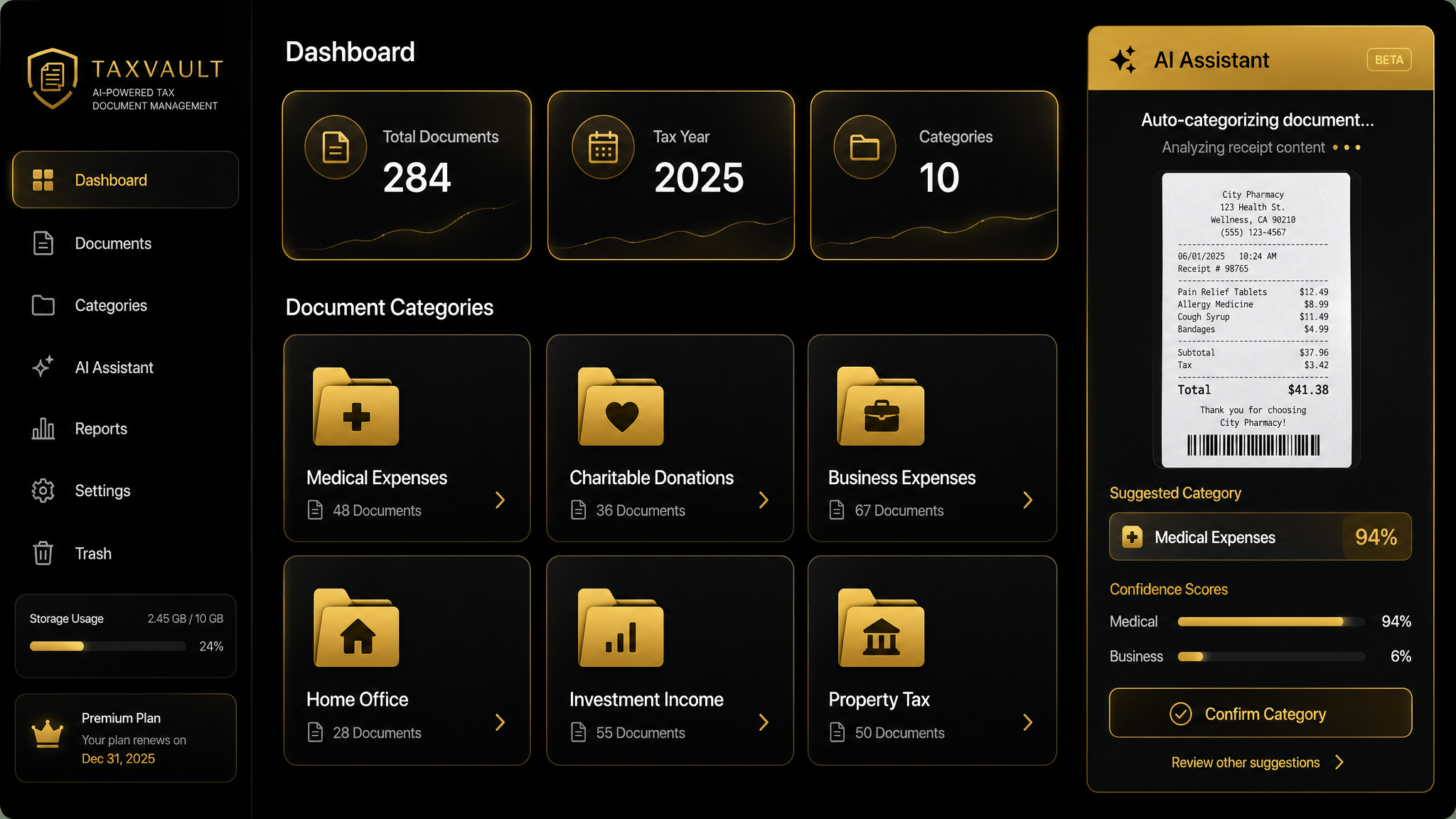
Digital File Cabinet & Tax Manager — AI document dashboard mockup

Project

Digital File Cabinet & Tax Manager

Client

Private Individual Client (Senior Taxpayer)

Industry

Personal Financial Records & Tax Preparation

Location

United States

Client Type

Individual / Senior Taxpayer

System Type

AI-Powered Document Management + Tax Organization

Retail Value

$18,000–$24,000

Client Investment

$6,500 + $750/yr hosting

01The Challenge

What was broken before the platform

Decades of tax receipts, statements, and records stored in a physical file cabinet — no digital copies, no backup, one disaster away from total loss.

A 3-hour round-trip drive each tax season just to deliver documents to the tax preparer — exhausting for an 84-year-old.

Inconsistent categorization and missed deductions because filing was done by memory and habit, not a system.

Hours spent searching for a single document when the tax preparer or insurance company requested it.

Manual, error-prone expense totaling — adding up receipts by hand, missing items, and second-guessing the math.

Absolutely no backup — if the cabinet was lost to fire, flood, or theft, decades of financial history would be gone.

A hard requirement that the system be simple enough for an 84-year-old with no tech background to use independently.

02Our Solution

The system we built

We built a secure cloud file cabinet that replaced the physical cabinet — every document uploaded, backed up, and accessible from any device, anywhere.

Bulk drag-and-drop upload (PDF, JPG, PNG, TIFF) lets the client scan and drop stacks of receipts at once instead of filing them one by one.

OCR automatically reads every uploaded document, extracting the vendor name, date, amount, and document type — no manual data entry.

An AI filing assistant suggests the top-3 best-fit tax folders for each document with confidence scores. The user simply confirms the right one.

10 pre-set tax categories (Medical, Charitable, Business Expenses, etc.) plus the ability to create custom and nested folders for anything else.

An automatic tax dashboard totals expenses by category and month with visual charts — replacing the hand-tabulation entirely.

One-click year-end ZIP export bundles every document plus a summary and CSV index — ready to email to the tax preparer in minutes, not drive across town.

03Key Features

Everything a paper cabinet can’t do

Digital File Cabinet + Tax Workspaces

Two integrated workspaces — a general file cabinet for any document and a dedicated tax manager for receipts and deductions.

10 Pre-Set Tax Folders + Custom

Medical, Charitable, Business Expenses, Home Office, and more — plus the ability to create any custom or nested folder structure.

Bulk Drag-and-Drop Upload

Drop a stack of PDFs, photos, or scanned receipts at once. Supports PDF, JPG, PNG, and TIFF formats.

OCR Receipt Extraction

Every uploaded document is automatically read — vendor, date, amount, and document type extracted without manual data entry.

AI Filing Suggestions

The AI suggests the top-3 best-fit tax folders with confidence scores for each document. You confirm — it files.

Full-Text Search & Filters

Search by keyword, date range, folder, amount, or tax year. Find any document in seconds, not hours.

Tax Dashboard & Charts

Automatic category and monthly expense totals with visual charts — see exactly where the money went, no hand math.

One-Click Year-End Export

Export a complete ZIP with every document, an expense summary, and a CSV index — email it to your tax preparer in minutes.

Secure Login & Cloud Backup

Protected login with automatic cloud backup. Every document is safe from fire, flood, theft, or hardware failure.

Senior-Optimized UI

Large text, clear labels, minimal steps, generous spacing, and no clutter — designed for an 84-year-old to use independently.

04The AI Layer

AI reads, sorts, and totals — you confirm

OCR Document Reading

Every uploaded receipt is automatically processed by OCR that extracts the vendor name, date, amount, and document type — eliminating manual data entry and making every document fully searchable.

AI Filing Assistant

After reading each document, the AI suggests the best-fit tax folder from the top-3 matches with confidence scores (e.g., "Medical: 94%, Business: 6%"). The user confirms the right choice — the AI handles the tedious reading and sorting.

Automatic Expense Totaling

The system automatically aggregates expenses by tax category and month, generating real-time totals and visual charts. No more hand-tabulation or adding up receipts on a calculator.

Honest Framing

AI handles the tedious reading and sorting — it does NOT make tax decisions or replace a tax professional. Every suggestion requires human confirmation before filing.

05Before vs. After

The transformation

Area
Before
After
Storage
Physical file cabinet — no backup
Searchable cloud library with 100% backup
Tax delivery
3-hour round-trip drive each season
Digital export emailed in minutes
Finding docs
Hours of searching through paper
Seconds — full-text search + filters
Expense totaling
Manual addition by hand
Automatic category & monthly totals
Filing accuracy
Inconsistent, memory-based
AI-assisted with confidence scores
Backup
None — one disaster = total loss
100% secure cloud backup
Usability
Paper — the only option the client could handle
Senior-friendly UI an 84-year-old uses independently
06Results & Metrics

Measurable impact

3 hrs

Tax-season drive eliminated

No more 1.5-hour-each-way round trip

Seconds

Document retrieval time

Down from hours of searching paper

Auto

Expense tabulation

Category & monthly totals — no hand math

1-click

Year-end tax export

Documents + summary + CSV, ready to email

100%

Documents backed up

From 0% — safe from fire, flood, theft

84 yrs

User's age

Uses the system independently, no assistance

07Investment vs. Value

$6,500 build — $18,000–$24,000 in comparable value

Client Investment

$6,500

+ $750/yr hosting & maintenance

Estimated Retail Value

$18,000–$24,000

Value Delivered

$11,500+

saved vs. comparable custom build

The client received an $18,000–$24,000-class AI document management and tax organization system for a $6,500 one-time investment ($5,000 development + $1,500 personalized training & onboarding), plus $750/year for cloud hosting and maintenance. The system replaced a physical file cabinet, eliminated a 3-hour round-trip drive every tax season, cut document retrieval from hours to seconds, automated expense totaling, and added full cloud backup — all in an interface an 84-year-old uses independently.

08Who This System Is For

Built for real people, not tech experts

Seniors and individuals who keep paper financial records and need a simple, secure way to go digital without a steep learning curve.

Households and sole proprietors wanting effortless tax-time organization — receipts automatically read, filed, totaled, and exported.

Anyone who drives hours to deliver tax documents and wants to send them digitally instead.

People who want every receipt and statement automatically backed up in the cloud, safe from physical loss.

Families managing financial records for an aging parent who needs an interface simple enough to use independently.

Still buried in paper?

We’ll show you exactly how to go from a file cabinet to a searchable cloud system — without a learning curve. Start with a free workflow audit.